offgrid
Purpose-built, self-hosted energy telemetry for mixed Victron/JBD/Zigbee systems: nothing to assemble, no cloud account, a read-only view you can safely share, and remote access through your own relay on the way.
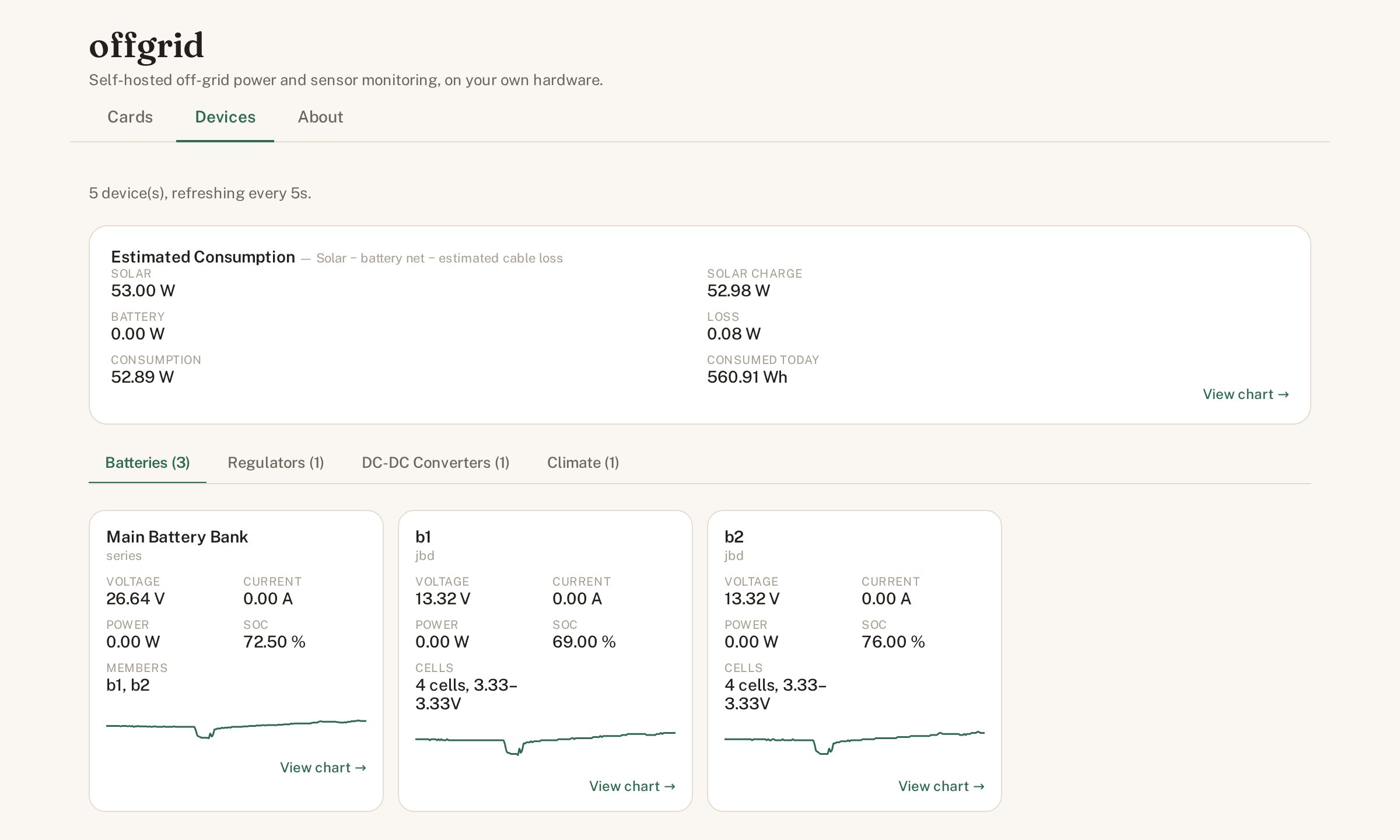
Your energy system. Your data. Nothing to assemble.
No cloud account. No monthly subscription. No company standing between you and the Pi in your own utility room — not for storage, and not for the dashboard.
offgrid does one job: watching the Victron chargers, JBD batteries and Zigbee sensors you actually have, on one screen, with the energy math already built in. You install it and authorize your devices — no integrations to piece together, no dashboards to build from scratch.
See it running
demo.offgridapp.mera.network is my own offgrid: the live status page for my own off-grid power system. It's the read-only public view described below — real readings from my Victron charger, JBD batteries and Zigbee sensors, the consumption estimate and my own cards — with nothing on it that can be changed.
What the alternatives ask of you
- Victron VRM is free and polished — for Victron gear and the third-party batteries Victron has certified for its GX devices. A JBD-based battery isn't on that list. VRM also needs a GX device or GlobalLink in your system, and your data lives on Victron's servers.
- Solar Assistant is self-hosted with a one-time price ($59 for the software, $179–229 with a Raspberry Pi included), and reads Victron inverter/chargers through a GX device. Its remote access runs through its own proxy servers.
- Home Assistant can do all of it, if you assemble it: its official Victron Bluetooth integration, a community integration for JBD batteries, Zigbee on top, then the energy dashboards and calculations built by hand. Its easiest remote access is Nabu Casa ($65/year); the free Tailscale route coordinates through Tailscale's servers unless you also host your own control server.
Home Assistant shows it can be done. offgrid is for when you want it done: one install, built for exactly this hardware mix.
One dashboard. Every device you own. Nobody else's server.
offgrid unifies Victron chargers, JBD-based battery packs, and Zigbee sensors — mixed brands, one screen — with the derived numbers built in rather than left for you to template: combined battery-bank state across series-wired packs, an estimated load consumption that's logged and charted, not just displayed, and cable-loss accounting between your charger and your bus.
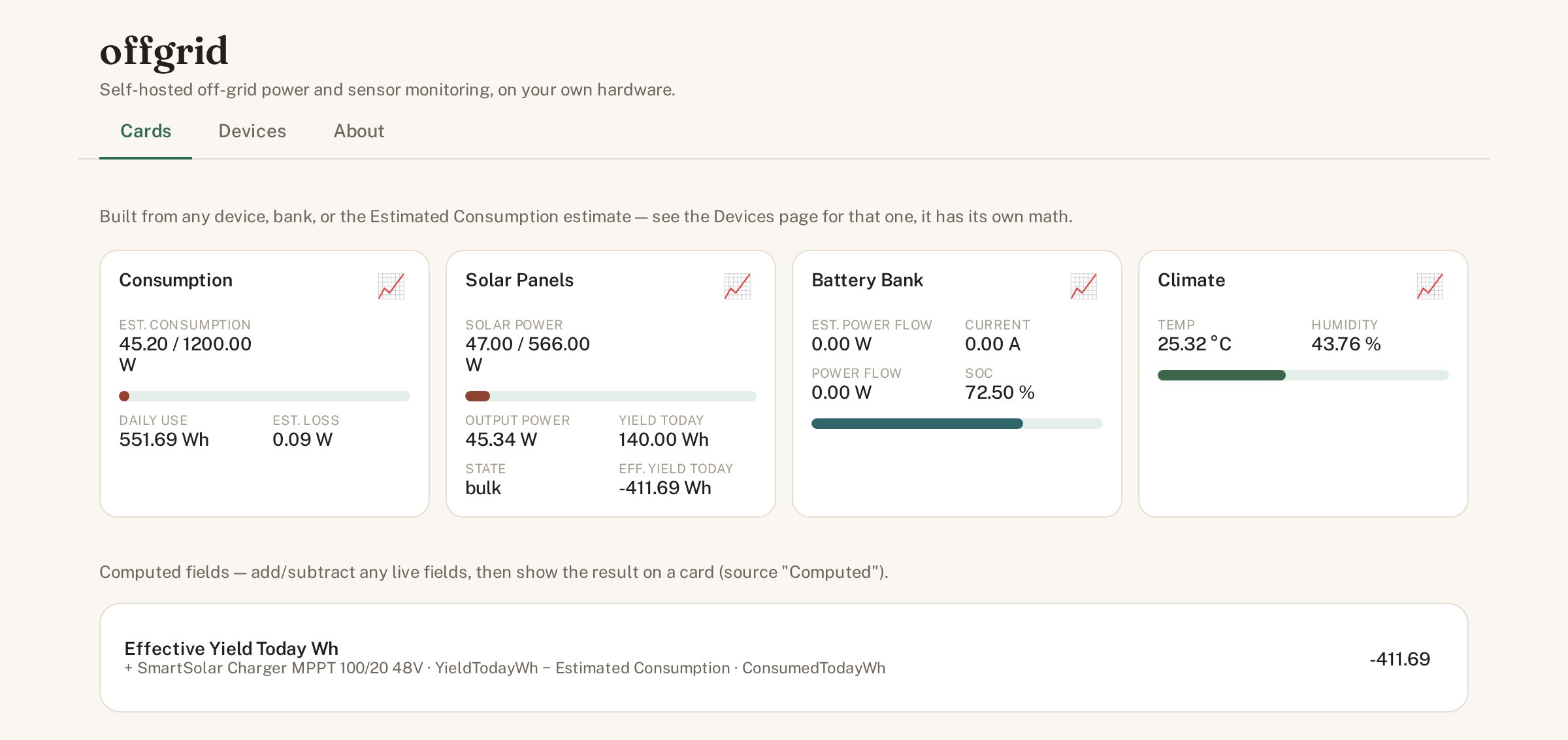
Know what your day actually looked like. Alongside live power, offgrid keeps a running estimate of what your loads consumed since midnight, in Wh — the load-side counterpart to the "yield today" your charger already reports.
Build your own dashboard cards from any field on any device — including meters that fill up toward a value you set, not just numbers on a page. Then go further with computed fields: add and subtract live values, or turn a device's power reading into a daily total in Wh. "Effective yield today" is one line: what the panels produced minus what you used. All of it is set up from the dashboard itself.
Share it without handing over the keys
offgrid serves a second, read-only dashboard on its own port: live readings, charts and your cards, with no way to change anything. It isn't the admin page with the buttons hidden — the routes that add, remove or reconfigure devices simply don't exist there, and device encryption keys never leave the admin side. Expose just that port, and the full dashboard stays on your home network.
Coming: full access from anywhere, through your own relay. We're building remote access through EphemNet — your own relay, no account, no subscription, no third-party coordination server between your phone and your Pi. Most remote-access options put somebody else in that path — a vendor's cloud, a subscription, or a VPN company's servers — and avoiding that today means running your own coordination server as well. It isn't released yet; until it is, the admin dashboard is LAN-only by design.
How it works
- Install offgrid on a Raspberry Pi already sitting near your system — it talks to your Victron gear over Bluetooth, your JBD batteries the same way, and Zigbee sensors through a Conbee II or similar. No new hardware to buy for the monitoring itself.
- Build your view. Custom cards from any field on any device, meters, and computed fields like "effective yield today" — on the full dashboard at home.
- Share the read-only view. Turn on the public dashboard and expose only its port: live readings, history and your cards, with nothing that can change your setup. (Coming: reaching the full dashboard from anywhere through your own EphemNet relay.)
Built to actually be trusted with your data
- Storage that doesn't grow forever. A tiered rollup keeps today's readings at full resolution and progressively downsamples older history — years of history in bounded space on the same SD card, not an ever-growing table that eventually chokes a Raspberry Pi.
- Real bugs, found and fixed against real data, not left as "known issues." A chart-history stability bug, a stale-reading bug after long-term storage rollups, a genuine sensor sampling-rate mismatch that could show impossible negative consumption — each one root-caused against actual production data and fixed with a committed regression test built from the real incident, not patched over.
- Every device's full decoded reading is kept, not just a display-friendly summary. Nothing you might need later is silently discarded to save space.
- A shared view that can't change anything. The public dashboard has no route that can add, remove or reconfigure a device, never returns device keys, and caps how much history a visitor can request so it can't be used to load down your Pi. A test fails if an admin route ever becomes reachable there.
- Numbers that don't invent energy. Daily totals are computed from smoothed readings, and time when a device wasn't reporting counts as nothing rather than being guessed at. A value that can't be computed shows as blank, never as a plausible-looking zero.
How it compares
| offgrid | Victron VRM | Solar Assistant | Home Assistant | |
|---|---|---|---|---|
| Victron + JBD + Zigbee on one screen | Yes, built in | Victron plus certified batteries; JBD isn't among them | Reads Victron inverter/chargers through a GX device | Yes, with an official Victron integration, a community JBD integration and Zigbee, assembled by you |
| Extra hardware needed | A Raspberry Pi (and a Zigbee stick for Zigbee) | A GX device or GlobalLink | A Raspberry Pi, plus a GX device for Victron | A server for Home Assistant |
| Cost | None | Free | $59 one-time (software); $179–229 with a Pi | Free; Nabu Casa remote access $65/year |
| Third party in the remote-access path | None — your own relay (in development; read-only view shareable today) | Victron's cloud | Its own proxy servers | Nabu Casa or Tailscale's servers, unless you self-host the control server |
| Where your data lives | Your own Pi | Victron's servers | On the device | Your own server |
Who this isn't for
If your whole system is one vendor's gear and you're fine with that vendor's cloud, Victron VRM already does this for free — offgrid won't beat it on convenience for a pure single-vendor setup. If your inverter is on Solar Assistant's list and you want a polished product for a one-time fee, it's simpler to get running. If you already run Home Assistant and enjoy assembling it, you can build most of this there — offgrid's case is that you shouldn't have to. And remote access through your own relay means you're the one keeping that relay up — this isn't a managed service, and it isn't trying to be one. It's for people who already run their own infrastructure, or want to, and won't accept a company standing between them and their own energy data.
Run your own
Your panels, your batteries, your data — and your connection to it, with nobody else in the loop.